
This is a fantastic mashup of Dr Who with the Monty Python “I fart in your general direction” and the Quest for the Holy Grail.
Category: Uncategorized
Should anyone ask, I am on a train.
I have always flown between Munich and Berlin but decided to take the 54 Euro per ticket ICE train. It wasn’t that fast for most of the route. I had been warned that the tracks are old in much of the former East German side. However, once we got onto the new tracks, the train really started to fly. Quite like taking the train – each seat comes with a built in plug socket which makes it possible to use a laptop. The extra leg room when compared with an aeroplane is also a nice plus. I’ll be in Berlin for the next 4 days.
I am staying with Marta (one of the founders of the design company Yellotoo), and catching up with old friends, including my buddy Ken from London who just happens to be here in Berlin for the weekend with his wife.
Should anyone ask, I am on a train.
I have always flown between Munich and Berlin but decided to take the 54 Euro per ticket ICE train. It wasn’t that fast for most of the route. I had been warned that the tracks are old in much of the former East German side. However, once we got onto the new tracks, the train really started to fly. Quite like taking the train – each seat comes with a built in plug socket which makes it possible to use a laptop. The extra leg room when compared with an aeroplane is also a nice plus. I’ll be in Berlin for the next 4 days.
I am staying with Marta (one of the founders of the design company Yellotoo), and catching up with old friends, including my buddy Ken from London who just happens to be here in Berlin for the weekend with his wife.
Should anyone ask, I live here


The Quality of online mapping really impresses me. I see that Microsoft is now doing orthogonal views of major cities. This is really cool. Should anyone need to steal 2 Siamese cats and some old computer and hifi equipment I suggest entry through the window marked with the arrow.

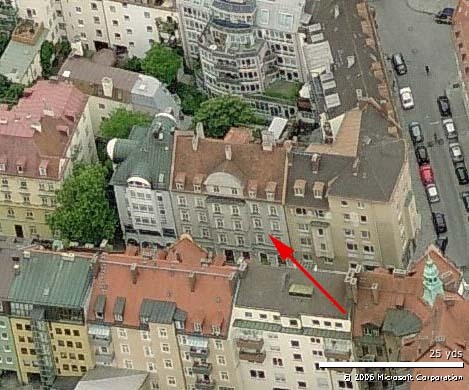
Should anyone ask, I live here
The Quality of online mapping really impresses me. I see that Microsoft is now doing orthogonal views of major cities. This is really cool. Should anyone need to steal 2 Siamese cats and some old computer and hifi equipment I suggest entry through the window marked with the arrow.
Should anyone ask, Voipdiscount outbound works nicely on an E61
Here’s my magic sauce to get it all working. By the end of this you should be seeing:
848.772012 10.15.11.8 -> 80.239.235.200 SIP Request: ACK sip:+491785450880@voipdiscount.com;user=phone
on the wire. That’s cool because:
- it means you are spending 0c/minute to call most of the world
- you are using your existing mobile phone (well, only if you are cool enough to have an E61 😉 )
- you are using your existing address book
- and not some shitty headset
So here’s how.
- Setup an account on voipdiscount and add the requisite credit (I think it’s about 10 Euro at this time).
- Setup and access point in your phone and using the webbrowser confirm that you can can connect to the interweb ™. If this doesn’t work do not pass Go, do not collect 200 dollars and go to Jail until you can get it working.
- In your phone: Applications-> Tools -> settings -> Connection -> Sip Settings (not Internet tel settings):
Profile name: Voipdiscount
Service Profile: IETF
Default Access point: (the access point you tested as working earlier)
Public user name: sip:(your voipdiscount username)@voipdiscount.com (remember to include the “sip:”)
Use compression: No
Registration: Always On
Use security: No-Proxy server
–Proxy server address: sip:voipdiscount.com (again include the “sip:”)
–Realm: voipdiscount.com
–User name: (your voipdiscount username)
–Password: (your voipdiscount password)
–Allow loose routing: Yes
–Transport Type: UDP
–Port:5060-Registrar Server
–Registrat server address: sip:voipdicount.com
–Realm: voipdiscount.com
–User name: (your voipdiscount username)
–Password: (your voipdiscount password)
–Transport Type: UDP
–Port:5060 - Now go to: Applications-> Tools -> settings -> Connection -> Internet tel settings:
add Voipdiscount as a working profile. - If you in wifi range your phone should register with the access point and subsequently with Voipdiscount.
- You may want to change your “Default call type” to internet (set in Applications-> Tools -> settings -> Phone)
Have fun!
Should anyone ask, Voipdiscount outbound works nicely on an E61
Here’s my magic sauce to get it all working. By the end of this you should be seeing:
848.772012 10.15.11.8 -> 80.239.235.200 SIP Request: ACK sip:+491785450880@voipdiscount.com;user=phone
on the wire. That’s cool because:
- it means you are spending 0c/minute to call most of the world
- you are using your existing mobile phone (well, only if you are cool enough to have an E61 😉 )
- you are using your existing address book
- and not some shitty headset
So here’s how.
- Setup an account on voipdiscount and add the requisite credit (I think it’s about 10 Euro at this time).
- Setup and access point in your phone and using the webbrowser confirm that you can can connect to the interweb ™. If this doesn’t work do not pass Go, do not collect 200 dollars and go to Jail until you can get it working.
- In your phone: Applications-> Tools -> settings -> Connection -> Sip Settings (not Internet tel settings):
Profile name: Voipdiscount
Service Profile: IETF
Default Access point: (the access point you tested as working earlier)
Public user name: sip:(your voipdiscount username)@voipdiscount.com (remember to include the “sip:”)
Use compression: No
Registration: Always On
Use security: No-Proxy server
–Proxy server address: sip:voipdiscount.com (again include the “sip:”)
–Realm: voipdiscount.com
–User name: (your voipdiscount username)
–Password: (your voipdiscount password)
–Allow loose routing: Yes
–Transport Type: UDP
–Port:5060-Registrar Server
–Registrat server address: sip:voipdicount.com
–Realm: voipdiscount.com
–User name: (your voipdiscount username)
–Password: (your voipdiscount password)
–Transport Type: UDP
–Port:5060 - Now go to: Applications-> Tools -> settings -> Connection -> Internet tel settings:
add Voipdiscount as a working profile. - If you in wifi range your phone should register with the access point and subsequently with Voipdiscount.
- You may want to change your “Default call type” to internet (set in Applications-> Tools -> settings -> Phone)
Have fun!
Should anyone ask, the “forcedeth” driver is faster in one direction
server: 10.7.12.1
mediapc: 10.7.12.6
both MTU 9000
dd if=/dev/zero bs=1M count=1000 |nc 10.7.12.6 2222 >/dev/null
1048576000 bytes (1.0 GB) copied, 9.73707 seconds, 108 MB/s
nice.
 dd if=/dev/zero bs=1M count=1000 |nc 10.7.12.1 2222 >/dev/null

1048576000 bytes (1.0 GB) copied, 56.6255 seconds, 18.5 MB/s
not so nice.
So much faster to copy data from server (nice intel gige) but sending data from media pc (Nvidia using reverse engineered “forcedeth”) is pitiful.
Interesting.
Should anyone ask, the “forcedeth” driver is faster in one direction
server: 10.7.12.1
mediapc: 10.7.12.6
both MTU 9000
dd if=/dev/zero bs=1M count=1000 |nc 10.7.12.6 2222 >/dev/null
1048576000 bytes (1.0 GB) copied, 9.73707 seconds, 108 MB/s
nice.
 dd if=/dev/zero bs=1M count=1000 |nc 10.7.12.1 2222 >/dev/null

1048576000 bytes (1.0 GB) copied, 56.6255 seconds, 18.5 MB/s
not so nice.
So much faster to copy data from server (nice intel gige) but sending data from media pc (Nvidia using reverse engineered “forcedeth”) is pitiful.
Interesting.
Should anyone ask, I prefer being on the inside
I have been travelling quite a bit with trains recently since I now get a 50% discount on all tickets. While my seat is comfortable, affords me a plug for my laptop, the most thrilling part of the trip is watching Arlington Road. Next step is to get a set of vacuum cups and ride outside.
 Should Anyone Ask