
I am speculating that the recent high temperatures have triggered the 2 disk failures on bunker. I am very pleased to be running in a raid’ed configuration. Data secuity is no laughing matter and so Robin came over and destroyed/extracted the magnets from the dead disks incase anyone should try to ressurect them and extract the data. Also with Robin’s help, 2 new fans have been added to bunker’s case to try and increase the airflow around the disks. Unfortunately the new fans are slightly too large and so I am going to have to buy some more tomorrow.
Category: Uncategorized
Motherboard robustness
I was over at Robin and Taska’s house last night – they brought a new media PC and are setting up mythtv on it. Was really impressed with the speed of the new Athlon dual core cpus. Never seen linux install so fast.
Unfortunately we connected up one of the firewire ports incorrectly and when we turned on the PC for the first time one of the controller chips started sparking, smoking and smelling terrible. Found out that some of the firewire controller chips legs had melted right off from the short. We disconnected the offending cable, brushed off the carbonised substance on the chip and the box magically worked, albeit without the firewire capability. The CPU teams get all the kudos but have to say I am very impressed with motherboard robustness!
Motherboard robustness
I was over at Robin and Taska’s house last night – they brought a new media PC and are setting up mythtv on it. Was really impressed with the speed of the new Athlon dual core cpus. Never seen linux install so fast.
Unfortunately we connected up one of the firewire ports incorrectly and when we turned on the PC for the first time one of the controller chips started sparking, smoking and smelling terrible. Found out that some of the firewire controller chips legs had melted right off from the short. We disconnected the offending cable, brushed off the carbonised substance on the chip and the box magically worked, albeit without the firewire capability. The CPU teams get all the kudos but have to say I am very impressed with motherboard robustness!
VoIP debugging


I have been fighting againt a problem with my VoIP calling setup. The problem presented itself last week and was not accompanied by any software upgrades or network changes on my end. I should first explain a little about my current setup. I use Asterisk as a software PBX. This handles outbound and inbound calls, voicemail and termniation of my London and German and US telephone numbers. Last week I noticed that when I made outbound calls via SipDiscount I would receive no ringing signal and also the call would never be fully setup.
Or so I though. After looking through my logs I discovered that the calls were actually being setup. At first I though that SipDiscount had changed their supported codecs. After searching on the internet it seemed that nobody really knew which were supported codecs. So I setup a list of all codecs that I could support and relied on the SIP negotiation phase to choose the correct one. Unfortunately the symptoms persisted.
On a hunch I then started tcpdumping and analysing the traffic on port 5060 (the SIP signalling port). All this seemed fine too. I saw a common codec being selected and the call setup and tear down completing without a problem.
I banged my head more and then decided to double check my firewall log. This seemed unnecessary since my VoIP calls had all been completing fine for the last year.
Mar  1 19:07:15 bunker DENY2: IN= OUT=ppp0 MAC= xsrc=62.245.233.186 DST=194.120.0.163 LEN=200 TOS=10 PREC=0x00 TTL=64 ID=693 DF PROTO=UDP SPT=17820 DPT=57344 LEN=180
Mar  1 19:07:15 bunker DENY2: IN= OUT=ppp0 MAC= xsrc=62.245.233.186 DST=194.120.0.163 LEN=200 TOS=10 PREC=0x00 TTL=64 ID=694 DF PROTO=UDP SPT=17820 DPT=57344 LEN=180
Mar  1 19:07:15 bunker DENY2: IN= OUT=ppp0 MAC= xsrc=62.245.233.186 DST=194.120.0.163 LEN=200 TOS=10 PREC=0x00 TTL=64 ID=695 DF PROTO=UDP SPT=17820 DPT=57344 LEN=180
Mar  1 19:07:15 bunker DENY2: IN= OUT=ppp0 MAC= xsrc=62.245.233.186 DST=194.120.0.163 LEN=200 TOS=10 PREC=0x00 TTL=64 ID=696 DF PROTO=UDP SPT=17820 DPT=57344 LEN=180
That seemed odd since my firewall script read:
iptables -A INPUT    -p udp -s 0.0.0.0/0 -d $VOIPIP --dport 10000:20000  -j accept-log
iptables -A OUTPUT -p udp -s $VOIPIP -d 0.0.0.0/0 --dport 10000:20000  -j accept-log
Hmmm. What had happened is that SipDiscount changed their reception port range to something outside the normal range for SIP calls. Normal SIP port ranges are 10000-20000. A quick change of my rules fixed the problem and I now have telephone calls with audio.
iptables -A INPUT    -p udp -s 0.0.0.0/0 -d $VOIPIP --dport 10000:20000  -j accept-log
iptables -A OUTPUT -p udp -s $VOIPIP -d 0.0.0.0/0 --sport 10000:20000  -j accept-log


VoIP debugging
I have been fighting againt a problem with my VoIP calling setup. The problem presented itself last week and was not accompanied by any software upgrades or network changes on my end. I should first explain a little about my current setup. I use Asterisk as a software PBX. This handles outbound and inbound calls, voicemail and termniation of my London and German and US telephone numbers. Last week I noticed that when I made outbound calls via SipDiscount I would receive no ringing signal and also the call would never be fully setup.
Or so I though. After looking through my logs I discovered that the calls were actually being setup. At first I though that SipDiscount had changed their supported codecs. After searching on the internet it seemed that nobody really knew which were supported codecs. So I setup a list of all codecs that I could support and relied on the SIP negotiation phase to choose the correct one. Unfortunately the symptoms persisted.
On a hunch I then started tcpdumping and analysing the traffic on port 5060 (the SIP signalling port). All this seemed fine too. I saw a common codec being selected and the call setup and tear down completing without a problem.
I banged my head more and then decided to double check my firewall log. This seemed unnecessary since my VoIP calls had all been completing fine for the last year.
Mar  1 19:07:15 bunker DENY2: IN= OUT=ppp0 MAC= xsrc=62.245.233.186 DST=194.120.0.163 LEN=200 TOS=10 PREC=0x00 TTL=64 ID=693 DF PROTO=UDP SPT=17820 DPT=57344 LEN=180
Mar  1 19:07:15 bunker DENY2: IN= OUT=ppp0 MAC= xsrc=62.245.233.186 DST=194.120.0.163 LEN=200 TOS=10 PREC=0x00 TTL=64 ID=694 DF PROTO=UDP SPT=17820 DPT=57344 LEN=180
Mar  1 19:07:15 bunker DENY2: IN= OUT=ppp0 MAC= xsrc=62.245.233.186 DST=194.120.0.163 LEN=200 TOS=10 PREC=0x00 TTL=64 ID=695 DF PROTO=UDP SPT=17820 DPT=57344 LEN=180
Mar  1 19:07:15 bunker DENY2: IN= OUT=ppp0 MAC= xsrc=62.245.233.186 DST=194.120.0.163 LEN=200 TOS=10 PREC=0x00 TTL=64 ID=696 DF PROTO=UDP SPT=17820 DPT=57344 LEN=180
That seemed odd since my firewall script read:
iptables -A INPUT    -p udp -s 0.0.0.0/0 -d $VOIPIP --dport 10000:20000  -j accept-log
iptables -A OUTPUT -p udp -s $VOIPIP -d 0.0.0.0/0 --dport 10000:20000  -j accept-log
Hmmm. What had happened is that SipDiscount changed their reception port range to something outside the normal range for SIP calls. Normal SIP port ranges are 10000-20000. A quick change of my rules fixed the problem and I now have telephone calls with audio.
iptables -A INPUT    -p udp -s 0.0.0.0/0 -d $VOIPIP --dport 10000:20000  -j accept-log
iptables -A OUTPUT -p udp -s $VOIPIP -d 0.0.0.0/0 --sport 10000:20000  -j accept-log
MythTV
After 2 years of on and off attempts to get MythTV working, I can can now confirm that it has been running well for the last couple of months. It’s currently recording TV shows (via dual tuners) and playing back DVDs and videos that I’ve collected. Although I’ve enjoyed not having a TV for the last couple of years, sometimes it’s nice to come home to the latest Simpsons episode or a recent news broadcast.
I ended up building a diskless system that boots from my main server. This allows me to run a virtually silent system and utilises already avaliable managed disk space on the backend server. Although slightly more complicated to setup, I’m particuarly fond of running workstations disklessly. It allows snapshotting of the filesystem before a big upgrade of trying untested software and makes replication to other systems easy. I had a couple of hickups with the NFS mounts and optimising them but they seem to be working well so far. Eventually I plan on ditching NFS and moving everything to Samba or if I’m in a particualry machioistic mood, OpenAFS. Ideally all systems will use Kerberos for authentication of mounts but I am still a little way off that goal. Naturally the MythTV box is fully LDAPified.
MythTV comes with a neat feature that will scan recorded TV shows for commercials and insert skip markers where is thinks commercials are beginning and ending. Most of the time this works remarkably well (and when it doesn’t there is always the fast forward button). Another neat feature is the option to play back shows at up to 1.5x the original speed. I sometimes use this feature at 1.2x for Startrek episodes with too many repetitive “can you raise the shields” scenes.
To actually display videos and TV I hooked the MythTV box up to a LCD projector via a (30M long) HDMI cable. I have the MythTV box running at a fixed 1280×720 resolution and do all video scaling on that rather than trusting the projectors onboard scaler. I figure that a beefy video card GPU will do a better job than some integrated scaler. The results are rather impressive. NASA has loads of HDTV clips and, after a long download, I my initial sceptism of HDTV melted away. The details, like seeing the astraunauts through the shuttle windows at launch time, made me realise how much information SDTV throws away.
I’m still controlling the MythTV box with a keyboard although I have bought a Microsoft MCE remote and keyboard. One weekend I will get around to actually installing them.
MythTV
After 2 years of on and off attempts to get MythTV working, I can can now confirm that it has been running well for the last couple of months. It’s currently recording TV shows (via dual tuners) and playing back DVDs and videos that I’ve collected. Although I’ve enjoyed not having a TV for the last couple of years, sometimes it’s nice to come home to the latest Simpsons episode or a recent news broadcast.
I ended up building a diskless system that boots from my main server. This allows me to run a virtually silent system and utilises already avaliable managed disk space on the backend server. Although slightly more complicated to setup, I’m particuarly fond of running workstations disklessly. It allows snapshotting of the filesystem before a big upgrade of trying untested software and makes replication to other systems easy. I had a couple of hickups with the NFS mounts and optimising them but they seem to be working well so far. Eventually I plan on ditching NFS and moving everything to Samba or if I’m in a particualry machioistic mood, OpenAFS. Ideally all systems will use Kerberos for authentication of mounts but I am still a little way off that goal. Naturally the MythTV box is fully LDAPified.
MythTV comes with a neat feature that will scan recorded TV shows for commercials and insert skip markers where is thinks commercials are beginning and ending. Most of the time this works remarkably well (and when it doesn’t there is always the fast forward button). Another neat feature is the option to play back shows at up to 1.5x the original speed. I sometimes use this feature at 1.2x for Startrek episodes with too many repetitive “can you raise the shields” scenes.
To actually display videos and TV I hooked the MythTV box up to a LCD projector via a (30M long) HDMI cable. I have the MythTV box running at a fixed 1280×720 resolution and do all video scaling on that rather than trusting the projectors onboard scaler. I figure that a beefy video card GPU will do a better job than some integrated scaler. The results are rather impressive. NASA has loads of HDTV clips and, after a long download, I my initial sceptism of HDTV melted away. The details, like seeing the astraunauts through the shuttle windows at launch time, made me realise how much information SDTV throws away.
I’m still controlling the MythTV box with a keyboard although I have bought a Microsoft MCE remote and keyboard. One weekend I will get around to actually installing them.
My Next Phone

I have been doing some thinking about what kind of phone I upgrade to. I currently have a Siemens Gigaset and a Sony Ericsson P900. One for at calling from home via VoIP and one for roaming on cellular networks. The market has changed a great deal since I last bought a phone. Last time it was simply a case of buying the latest mobile and a decent landline handset.
I now make most of my calls from home since via Sip Discount. I have free calls to most of the worlds landlines. One thing inhibiting me using this service more is the lack of phone book synchronisation between OS X Address book and my Gigaset. I had placed an order for a Cisco 9760 deskphone but that relied on me loading up 3rd party software to browse my LDAP directory for numbers and generally seemed like a lot of hassle. Also I would have subsequently had to invest another 100€ in a bluetooth headseat to be able to use this phone around the house. After some thinking, reading horror stories about finding compatible firmware, and Cisco’s lack of support to private customers, I cancelled my order.
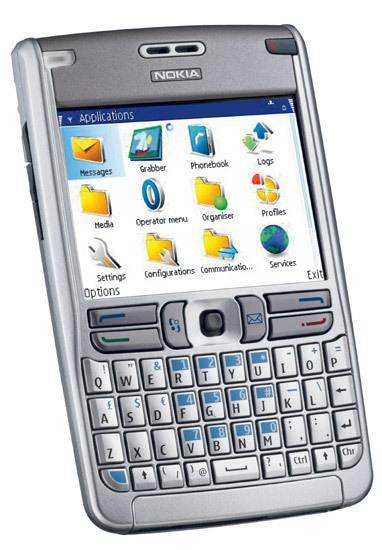
I am pleased I did. Interestingly phones are now appearing on the market that appear to bridge the gap between mobile and landline. The key to this is the nascent VoIP industry. These new phones come with the ability to run (although not installed by default) a SIP client allowing my to connect to any VoIP provider via their, also now included, 802.x wireless ethernet interface. A good example of these is the new Nokia E61 handset.

I am sure this gives the carriers the creeps more than they would like to admit in their current round of press releases, but for the end consumer it opens up all sorts of possibilities. I can now, from any open access point, make a call via my voip provider without paying a cent to my wireless carrier. Calling back to England while walking around Munich is now 0 cents/minute instead of 3€/minute. I can now use my cellphone at home to make calls and it’s directory of contacts is updated from my desktop.
For a long time I struggled to have my mobile receive and make calls over bluetooth. One should in theory be able to run a SIP client on existing phones and send the VoIP call to a bluetooth access point and then out to a VoIP provider on the net. There are 3 problems I came across when trying to get this working properly. Firstly, as far as I can tell, the carriers/handset manufacturers either blocked, didn’t enable or do not expose an API to their microphone and speaker from sofware. If they do it is fairly basic and only allows one to play back and record sounds. Secondly, dialing using the address book does not seem possible. Thirdly, the software on the receiving end of my phone’s bluetooth channel, chan_bluetooth, is no longer being actively developed.
These new phones claim to do exactly what I have been trying to get working for the last year. Although they use wireless ethernet instead of bluetooth. If they work as claimed, I could be travelling on business and making my callls back home via the hotel wireless network saving a bundle.
I foresee this next generation of phones putting forcing the carriers to look harder at how they charge customers for calls. Users are waking up to the fact that the marginal cost of a call has trended towards 0c/minute. If a user can make the majority of their calls without touching their carrier’s cell network they save money and the carrier recoups none of their huge investment on their network.
Carriers will, as their reputation proves, try to regulate away this competition through burdens like taxes on VoIP calls and when these prove ineffective, their pricing models will start to change. Instead of per-minute charges, we will start seeing data charges and carriers persuading users to make their SIP calls via their (probably more reliable) wireless data networks.
And there is more bad news resulting from these hadsets for the carriers. Today we see customers only ordering a landline to get DSL. There is very little money to be made in running copper around a city when your customers don’t make calls through you. The operator who just provides a pipe has lost out. Just as the landline telephone operators have been marginalized by DSL and all the services this brings, so too will the cellular carriers be marginalized unless they can keep their network completely closed. These new phones show they cannot.

My Next Phone
I have been doing some thinking about what kind of phone I upgrade to. I currently have a Siemens Gigaset and a Sony Ericsson P900. One for at calling from home via VoIP and one for roaming on cellular networks. The market has changed a great deal since I last bought a phone. Last time it was simply a case of buying the latest mobile and a decent landline handset.
I now make most of my calls from home since via Sip Discount. I have free calls to most of the worlds landlines. One thing inhibiting me using this service more is the lack of phone book synchronisation between OS X Address book and my Gigaset. I had placed an order for a Cisco 9760 deskphone but that relied on me loading up 3rd party software to browse my LDAP directory for numbers and generally seemed like a lot of hassle. Also I would have subsequently had to invest another 100€ in a bluetooth headseat to be able to use this phone around the house. After some thinking, reading horror stories about finding compatible firmware, and Cisco’s lack of support to private customers, I cancelled my order.
I am pleased I did. Interestingly phones are now appearing on the market that appear to bridge the gap between mobile and landline. The key to this is the nascent VoIP industry. These new phones come with the ability to run (although not installed by default) a SIP client allowing my to connect to any VoIP provider via their, also now included, 802.x wireless ethernet interface. A good example of these is the new Nokia E61 handset.
I am sure this gives the carriers the creeps more than they would like to admit in their current round of press releases, but for the end consumer it opens up all sorts of possibilities. I can now, from any open access point, make a call via my voip provider without paying a cent to my wireless carrier. Calling back to England while walking around Munich is now 0 cents/minute instead of 3€/minute. I can now use my cellphone at home to make calls and it’s directory of contacts is updated from my desktop.
For a long time I struggled to have my mobile receive and make calls over bluetooth. One should in theory be able to run a SIP client on existing phones and send the VoIP call to a bluetooth access point and then out to a VoIP provider on the net. There are 3 problems I came across when trying to get this working properly. Firstly, as far as I can tell, the carriers/handset manufacturers either blocked, didn’t enable or do not expose an API to their microphone and speaker from sofware. If they do it is fairly basic and only allows one to play back and record sounds. Secondly, dialing using the address book does not seem possible. Thirdly, the software on the receiving end of my phone’s bluetooth channel, chan_bluetooth, is no longer being actively developed.
These new phones claim to do exactly what I have been trying to get working for the last year. Although they use wireless ethernet instead of bluetooth. If they work as claimed, I could be travelling on business and making my callls back home via the hotel wireless network saving a bundle.
I foresee this next generation of phones putting forcing the carriers to look harder at how they charge customers for calls. Users are waking up to the fact that the marginal cost of a call has trended towards 0c/minute. If a user can make the majority of their calls without touching their carrier’s cell network they save money and the carrier recoups none of their huge investment on their network.
Carriers will, as their reputation proves, try to regulate away this competition through burdens like taxes on VoIP calls and when these prove ineffective, their pricing models will start to change. Instead of per-minute charges, we will start seeing data charges and carriers persuading users to make their SIP calls via their (probably more reliable) wireless data networks.
And there is more bad news resulting from these hadsets for the carriers. Today we see customers only ordering a landline to get DSL. There is very little money to be made in running copper around a city when your customers don’t make calls through you. The operator who just provides a pipe has lost out. Just as the landline telephone operators have been marginalized by DSL and all the services this brings, so too will the cellular carriers be marginalized unless they can keep their network completely closed. These new phones show they cannot.
About Imaginator
Imaginator is the name of an old company that I setup in 1996. Imaginator designed websites and did some consulting. Most of all it was an warehouse space that a some Christ’s Hospital Old Blues would hang out in. We had a 500 kbps Internet connection which was quite something back then. Downstairs from us was Backspace, a cybercafe started by James Stephens. We also had Ninja Tune and Obsolete (now “lateral.net”) as neighbors.
Imaginator ran for about a year before it became too much work and overhead for me. Our lease was up and it seemed like a good time to “shut up shop”. We managed to host the imaginator.com domain, email and website on the building’s router, aka atlas.imaginator.com. This continued for about 6 months until a new sysadmin at Medium Rare logged onto the router and thought it had been hacked. Fortunately we were able to get an archive of the disk and start elsewhere.
Elsewhere was zeus.imaginator.com which we hosted at Tecc. We were quite proud of Zeus. Zeus contained one of the worlds first 10 000 rpm disk drives. Zeus was retired mid 2001.
Zeus was recently replaced by Bunker. Hopefully bunker will keep running for many years. Bunker was designed for storage. It can hold 8 hard disks and RAID them accordingly.
Today imaginator.com is the umbrella for a couple of services, web, shell and email users. If you want to join just drop me a note.
 Should Anyone Ask